
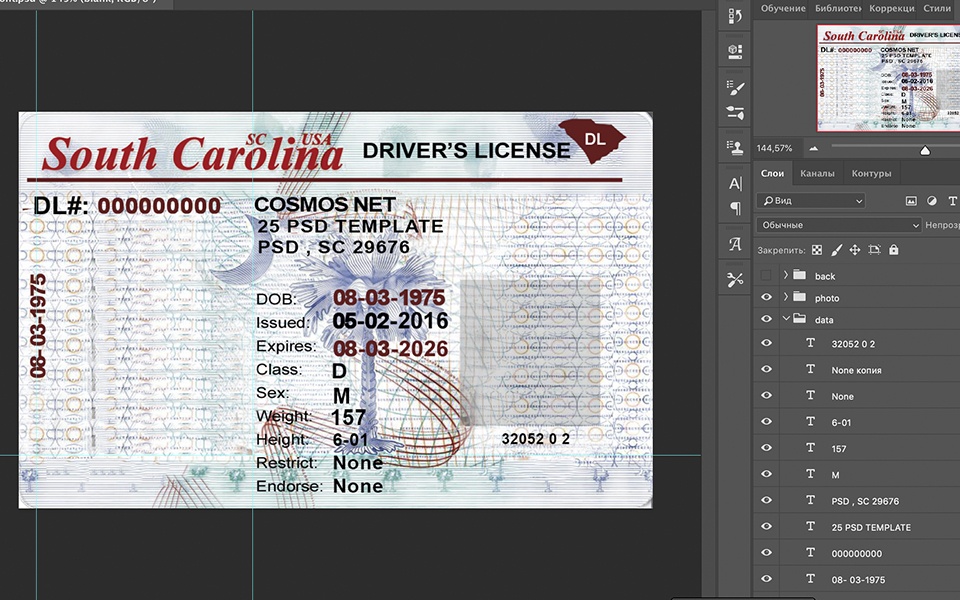


The Importance of Visual Accuracy in Driver License Design
Creating a convincing and visually accurate South Carolina driver license requires more than just placing text on a card. Precision in typography, layout, and texture is essential, as even minor deviations can reveal digital constructions. Fonts must match official typefaces exactly, and spacing between elements needs to replicate the original layout. The challenge lies in reproducing the official design digitally while maintaining a natural, print-ready look that avoids flat or overly smooth appearances. Such attention to detail ensures the final product meets expectations for close-up inspection, whether for design evaluation or illustrative use.
Addressing the Challenges of Digital Document Design
This template solves common issues with digital license designs by carefully reconstructing each element to reflect the original driver license’s attributes. Unlike generic templates that often look flat or off-scale, this file maintains proper layering, shadows, and highlights, which create depth and tactile realism. You can confidently adjust features such as name, address, date of birth, and photo placeholders without losing design integrity. For further insights into the characteristics that define high-quality digital documents, we recommend reading our technical guide on Document Quality.
Technical Visual Specifications
The South Carolina Driver License PSD Template is engineered to a 1:1 scale, meaning the dimensions match the original card exactly. Typography has been matched to official fonts through careful analysis, ensuring that all characters align with the authentic style. To enhance realism, subtle texture overlays replicate the card stock finish and background patterns used in official licenses. All layers are organized for precision editing, including the separation of front and back card components. This file is compatible with Adobe Photoshop and similar applications that support intelligent layering.
For designers looking to expand their collection of highly detailed editable documents, consider exploring the South Africa University of South Africa National Diploma in Engineering – Fully Editable High Resolution. It offers another example of precision layered PSD assets suitable for professional use.
Customization and Editing Workflow
Opening this template in Adobe Photoshop reveals fully layered files, including smart objects for photo and text fields. To customize, select each text box and replace the placeholder information with your own data, taking care not to disrupt the layer order or linked masks. Smart objects allow photo replacement via simple double-clicking and saving, maintaining the card’s visual consistency. The layout uses vector shapes and editable text layers to preserve sharpness at any zoom or print size.
For users expanding their editing skills or seeking additional template resources, we recommend the Australia University of New South Wales Graduate Diploma in Chemical Process Engineering Template as a complementary tool with similar layered design advantages.
Production and Printing Recommendations
For best print results, use a matte or semi-gloss photo paper that closely resembles official license card stock textures. Ensure your printer settings are set to the highest DPI (at least 300 dpi) to maintain the sharpness of fine text and background patterns. Avoid glossy papers that may produce glare, which can obscure details in photos or holograms. After printing, allow ink to fully dry to prevent smudging, especially around textured areas.
To complete your collection of high-resolution editable templates, check out the South Africa Damelin College Diploma in Information Technology Template, which pairs well for producing professional, detailed document visuals ready for print or digital display.
Visual Field Breakdown
| Field | Details |
|---|---|
| Photo Area | Placeholder layer with smart object for quick photo insertion |
| Full Name | Editable text layer, official font matching |
| Address | Layered text box with controlled spacing |
| License Number | Exact font and spacing replicate official format |
| Date of Birth | Formatted text layer for consistency |
| Height and Weight | Separate editable text layers with precise placement |
| Expiration Date | Clear, readable text matching original layout |
Achieving the Perfect On-Camera Look
For visual projects requiring close-up photography of the document, several tips can help achieve a realistic appearance. Ensure lighting is soft and even to avoid harsh shadows or glare. Use a macro lens to capture fine details without distortion. Position the card flat to the camera sensor to avoid perspective skew. After editing, print on textured paper to accentuate depth and reduce unwanted shine. These steps help maintain the card’s authenticity in high-resolution images and video scenes.




Gabriel Roberts (verified owner) –
No viruses, safe download.